
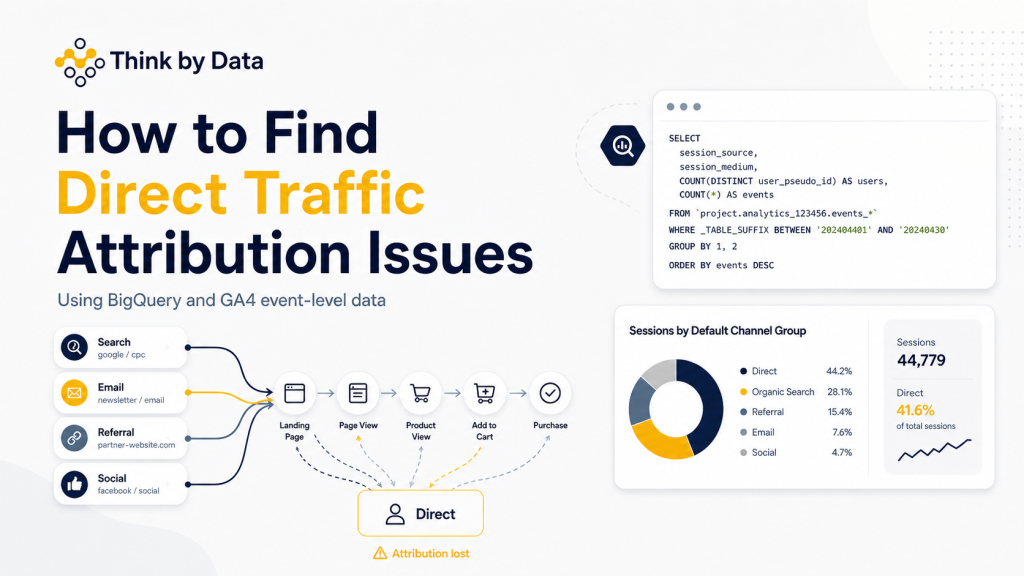

Yes, in some cases GA4 event-level data in BigQuery can show whether a session starts with a known source and later appears as Direct. This can help you investigate attribution issues after a migration, SPA implementation, payment gateway redirect, consent change, or tracking rebuild.
When traffic suddenly increases or decreases after a website migration, the first question should not always be:
“Is performance better or worse?”
A better first question is:
“Can we still trust the measurement?”
This is especially important after major ecommerce changes such as a headless migration, SPA implementation, tracking rebuild, consent platform change, or GA4 migration.
One issue I wanted to investigate was whether a user journey could start with a known traffic source, such as Google, email, paid search, or referral, and then later appear as Direct within the same journey.
This matters because if GA4 starts over-reporting Direct traffic, it can affect how the business understands channel performance, marketing ROI, attribution, and customer behaviour.
The problem
In GA4 reports, Direct traffic can sometimes increase after a technical change. But that does not always mean more users are coming directly to the website.
Sometimes it can mean the original traffic source is being lost during the journey.
This can happen for different reasons, including:
- SPA route changes
- Incorrect page view tracking
- Broken referral handling
- Consent behaviour
- Missing campaign parameters
- Payment gateway journeys
- Tag firing issues
- Session restarts
- Migration-related tracking changes
So instead of only looking at the GA4 interface, I used the GA4 BigQuery export to inspect the event-level data.
The question
The question I wanted to answer was:
Can one GA4 session start with a known source and later become Direct?
I also wanted to separate this from another situation:
Does a user start a new session as Direct after previously coming from a known source?
These two issues are different.
One can suggest an in-session attribution or tracking problem. The other may be expected session behaviour, but still needs to be understood in context.
The logic
The query does five things:
- Pulls event-level GA4 data from BigQuery
- Builds a session key using
user_pseudo_idandga_session_id - Derives a source using
gclid, manual source, and traffic source fields - Checks whether the source changes to Direct within the same session
- Compares this with cases where a new session starts as Direct after a previous known source
The BigQuery SQL query
You can copy and paste the query below.
You only need to change:
The _TABLE_SUFFIX date range
PROJECT.DATASET.events_*
WITH base AS (
  SELECT
    user_pseudo_id,

    (SELECT value.int_value
     FROM UNNEST(event_params)
     WHERE key = 'ga_session_id') AS ga_session_id,

    event_timestamp,

    collected_traffic_source.manual_source AS manual_source,
    collected_traffic_source.manual_medium AS manual_medium,
    collected_traffic_source.gclid AS gclid,

    traffic_source.source AS traffic_source_source,
    traffic_source.medium AS traffic_source_medium

  FROM `PROJECT.DATASET.events_*`
  WHERE _TABLE_SUFFIX BETWEEN '20260401' AND '20260422'
),

cleaned AS (
  SELECT
    *,
    CASE
      WHEN gclid IS NOT NULL THEN 'google'
      WHEN manual_source IS NOT NULL THEN manual_source
      WHEN traffic_source_source IS NOT NULL THEN traffic_source_source
      ELSE '(direct)'
    END AS derived_source
  FROM base
  WHERE ga_session_id IS NOT NULL
),

journey AS (
  SELECT
    *,
    LAG(derived_source) OVER (
      PARTITION BY user_pseudo_id, ga_session_id
      ORDER BY event_timestamp
    ) AS prev_source
  FROM cleaned
),

session_switch AS (
  SELECT
    user_pseudo_id,
    ga_session_id,
    MAX(
      CASE
        WHEN prev_source IS NOT NULL
             AND prev_source != '(direct)'
             AND derived_source = '(direct)'
        THEN 1 ELSE 0
      END
    ) AS switched_to_direct
  FROM journey
  GROUP BY user_pseudo_id, ga_session_id
),

session_start AS (
  SELECT
    user_pseudo_id,
    ga_session_id,
    MIN(event_timestamp) AS session_start_ts,
    ARRAY_AGG(derived_source ORDER BY event_timestamp LIMIT 1)[OFFSET(0)] AS session_source
  FROM cleaned
  GROUP BY user_pseudo_id, ga_session_id
),

session_compare AS (
  SELECT
    *,
    LAG(session_source) OVER (
      PARTITION BY user_pseudo_id
      ORDER BY session_start_ts
    ) AS prev_session_source
  FROM session_start
)

SELECT
  COUNT(DISTINCT CONCAT(user_pseudo_id, '-', ga_session_id)) AS total_sessions,

  COUNTIF(switched_to_direct = 1) AS in_session_switch,

  COUNTIF(
    prev_session_source IS NOT NULL
    AND prev_session_source != '(direct)'
    AND session_source = '(direct)'
  ) AS new_session_direct

FROM session_switch
LEFT JOIN session_compare
USING (user_pseudo_id, ga_session_id);
How to read the results
total_sessions
This is the total number of GA4 sessions included in the analysis.
in_session_switch
This shows how many sessions moved from a known source to Direct within the same GA4 session.
This is the key number to investigate.
If this number is unusually high, especially after a migration or tracking change, it may suggest that the original traffic source is being lost during the journey.
new_session_direct
This shows how many users started a later session as Direct after previously having a known source.
This is not always a problem. A user may genuinely return directly later.
But if this number increases sharply after a migration, it is still worth investigating.
When Should You Use This Query?
This query is useful when:
- Direct traffic increases suddenly in GA4
- Organic, Paid, Email, or Referral traffic drops unexpectedly
- You have recently migrated to a new website platform
- You have moved to a headless or SPA website
- You have changed GA4, GTM, or consent setup
- You suspect payment gateways are affecting attribution
- You want to validate GA4 data quality in BigQuery
Final thought
This is where BigQuery becomes very powerful for GA4.
The GA4 interface is useful for reporting, but BigQuery allows analysts to validate what is happening underneath the reports.
For me, good analytics is not only about collecting data.
It is about protecting decision quality.
Before using the data to make business decisions, we need to make sure the data can be trusted.

