

Sometimes in digital analytics, you don’t need another dashboard.
You need to understand what actually happened during one specific customer journey.
This can happen for many reasons. You might be investigating an unusual transaction, trying to understand customer behaviour before a purchase, checking the sequence of ecommerce events, or responding to a signal from Customer Service that something unexpected may have happened.
In these situations, aggregated reports don’t always give you enough detail.
This is where GA4 event-level data and BigQuery can be useful.
The idea
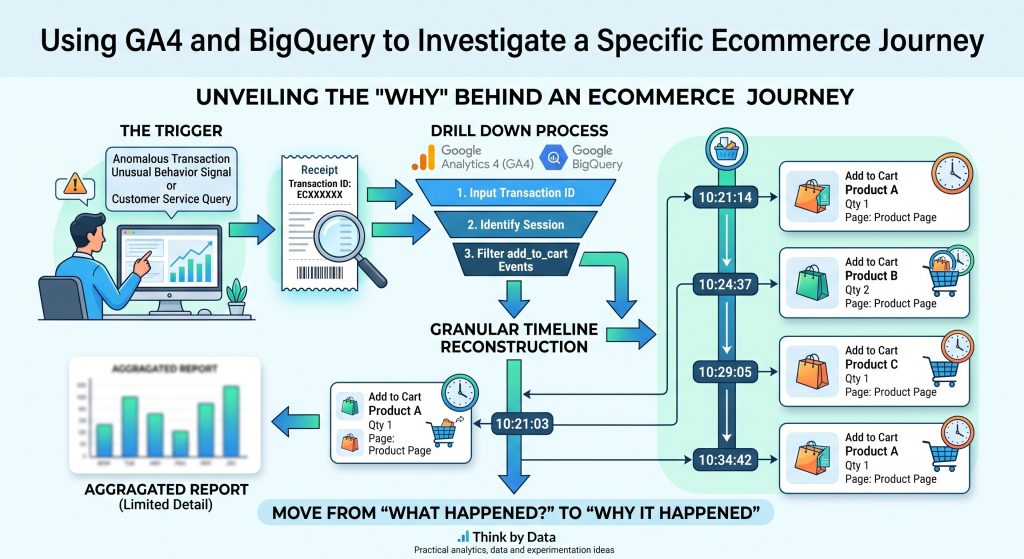
One simple approach is to start with a specific transaction ID, identify the session in which the purchase happened, and then look at the add_to_cart events that occurred during that session.
This allows you to build a simple timeline of basket activity.
For example:
Transaction → Session → Add to Cart → Product → Timestamp → Page
Instead of asking only:
“How many add-to-cart events did we have?”
you can start asking:
- What products were added?
- When were they added?
- In what sequence?
- How many units were added?
- Which page did the action happen on?
- Did anything unexpected happen during the journey?
- What happened before the final purchase?
The query
The query below uses a transaction ID to identify the relevant purchase and then connects it to the add_to_cart events from the same user session.
-- ============================================================
-- Investigate Add-to-Cart Events for a Specific Transaction
-- ============================================================

-- Update these values before running:
-- Transaction ID: ECXXXXXXXX
-- Date range: 2026-08-01 to 2026-08-06

WITH purchase AS (

  SELECT
    user_pseudo_id,

    -- Extract GA4 session ID
    (
      SELECT value.int_value
      FROM UNNEST(event_params)
      WHERE key = 'ga_session_id'
    ) AS ga_session_id,

    ecommerce.transaction_id

  FROM `project.dataset.events_*`

  WHERE _TABLE_SUFFIX BETWEEN '20260801' AND '20260806'
    AND event_name = 'purchase'
    AND ecommerce.transaction_id = 'ECXXXXXXXX'
),

add_to_cart AS (

  SELECT
    event_date,
    user_pseudo_id,

    -- Extract GA4 session ID
    (
      SELECT value.int_value
      FROM UNNEST(event_params)
      WHERE key = 'ga_session_id'
    ) AS ga_session_id,

    -- Convert GA4 timestamp to readable timestamp
    TIMESTAMP_MICROS(event_timestamp) AS add_to_cart_time,

    -- Page information
    (
      SELECT value.string_value
      FROM UNNEST(event_params)
      WHERE key = 'page_location'
    ) AS page_location,

    (
      SELECT value.string_value
      FROM UNNEST(event_params)
      WHERE key = 'page_title'
    ) AS page_title,

    -- Product information
    item.item_id,
    item.item_name,
    item.item_brand,
    item.item_category,
    item.quantity,
    item.price

  FROM `project.dataset.events_*`,
  UNNEST(items) AS item

  WHERE _TABLE_SUFFIX BETWEEN '20260801' AND '20260806'
    AND event_name = 'add_to_cart'
)

SELECT
  p.transaction_id,

  -- Event information
  a.event_date,
  a.add_to_cart_time,

  -- Product information
  a.item_id,
  a.item_name,
  a.item_brand,
  a.item_category,
  a.quantity,
  a.price,

  -- Page information
  a.page_title,
  a.page_location

FROM purchase AS p

INNER JOIN add_to_cart AS a
  ON p.user_pseudo_id = a.user_pseudo_id
  AND p.ga_session_id = a.ga_session_id

ORDER BY
  a.add_to_cart_time;
Note: Replace project.dataset with your own GA4 BigQuery export table and change the transaction ID and date range to match your analysis.
Why can this be useful?
1. Investigating a specific transaction
If you have a transaction that you want to understand, you can work backwards from the purchase and see what basket activity happened during that session.
2. Understanding customer behaviour
You can see how the customer built their basket rather than only looking at the final order.
For example, did they add one product and purchase immediately, or did they build a larger basket over several minutes?
3. Investigating unexpected behaviour
Sometimes you receive a signal from another team, such as Customer Service, that something unusual may have happened.
Instead of immediately jumping into thousands of sessions, you can start with the specific transaction and reconstruct the relevant part of the journey.
The goal isn’t necessarily to prove what happened from GA4 alone.
The goal is to find evidence that tells you where to investigate next.
4. Understanding timing
Because event_timestamp is converted into a readable timestamp, you can see exactly when each add-to-cart event occurred.
This can help when investigating the sequence of events:
Product interaction → Add to Cart → More browsing → Another Add to Cart → Checkout → Purchase
5. Connecting analytics with technical investigation
This is where I find event-level analytics particularly useful.
GA4 can tell you what was recorded.
BigQuery lets you query those events at a much more granular level.
That means analytics can sometimes help answer questions that initially look like product, development, or technical questions.
One important limitation
An add_to_cart event in GA4 tells you that the event was recorded.
It doesn’t automatically prove that the customer intentionally performed that action. That’s an important distinction. If you’re investigating something unusual, GA4 should be treated as evidence, not necessarily as the single source of truth.
You may need to compare the analytics data with other sources such as application logs, order data, Customer Service information, or session recordings.
The bigger idea
This is a relatively simple query, but the principle behind it is useful.
When something looks unusual in your ecommerce data, you don’t always need to start with a complicated analysis.
Sometimes you can start with one transaction. Find the session. Reconstruct the events.
Look at the sequence.
Then ask:
What actually happened during this journey?
That’s often where the interesting part of digital analytics begins.

